I AM DELETING THIS SITE TOMORROW, so head on over to http://blogwave.net/rats for my new blog which I'll edit a lot more regularly. Enjoyed my company? Then follow me and check out my new blog! Our free podcasts full of blogging tips bought to you from 3 slightly drunken lads are up and available for free easy streams to listen to whilst you blog from http://blogwave.net. Want Google traffic tips or hundreds of other tips? Then hit up BlogWave!
Showing posts with label guide. Show all posts

Friday, 8 October 2010

Stephen Fry's increase traffic tip!

Ok so this isn't really one of Stephen Fry's tips on how to increase traffic to your blog, but it is relevant to him, and worked substantially well for me. Although this isn't an easy method of increasing traffic and bringing more people to your site, it is an extremely successful one!


First things first; GET TWITTER. Although a lot of people have signed up to Twitter for the pointless reason of just adding their friends, who they already have on Facebook, Twitter is actually an amazing way to stalk, I mean follow* celebrities in their daily life. Me? Personally I use Twitter to follow members of bands I love. And through it, I've found out about secret gigs or cheaper merch etc. However, it's nice just on a general level to see members of huge bands as just regular human beings. For example, Frank Carter, lead vocalist of post-hardcore band Gallows, is always Tweeting about his Kill to Death ratio on Xbox Live. It's just nice to see famous people, as well....just people.
'How is this post relevant to ME' you might be asking. 'I don't care about celebrities and their lives.' Well that's fair enough, but the long and short of it is, if you can make friends with a celebrity, the likelihood is they will Tweet your blog.Now I'm not saying that Stephen Fry (I use him as an example because he has the most followers on Twitter out of most celebrities) is going to Retweet each and everyone of your blogs. Far from it. Aim a little smaller.Now if you have been following me for while, you'll recall my post about Frank Turner (You can read it here: http://studentaroundtheworld.blogspot.com/2010/09/perfect-travel-music.html)As one of my favourite musicians ever, (Seriously I strongly urge you to check him out) I of course have him on Twitter and over the last couple of months have been Retweeting (passing in for you non Twitter users) his messages etc.Now, after Tweeting about my blog post that included a short Frank Turner review, I was shocked, yet amazed find that he had passed on my blog to his 13 000+ followers!


And has he has THIS many people following him:


My blog received a huge amount of traffic. As Frank Turner's tweets are linked to his website, I was getting several sources of traffic, and my views rose sharply!
So guys, if you're using twitter, START FOLLOWING CELEBRITIES! Be friendly with them. Banter with them. And if they're a decent bloke like Mr Turner is, then who knows, maybe one day they'll retweet your blog to!


Oh, and Justin Bieber and Britney Spears aren't going to Retweet your blogs, so aim a littttttle smaller than the big celebs!


Read more...

Thursday, 7 October 2010

How to increase traffic to your blog with Google searches

OK guys, so although this post may not be directly related to travelling, in this post I'm going to tell you one way, that successfully worked for me, to increase traffic to your blog.

Now, this certainly isn't going to bring you 5000 million viewers over night, but if done correctly, you will see a steady rise in your traffic.

Ok I'm going to try and make this as simple to follow as possible as it can be quite confusing.


Now, I know a lot of you are having trouble with making your blog Google searchable. The computer and coding literate amongst have tried added Meta tags to your blog in order to increase traffic. Although I have tried this myself, I haven't noticed much on an increase and have been told that Google no longer uses Meta tags to make it searchable.


Step one. The first thing you need to do is to visit http://www.google.co.uk/addurl/ and add your blog page URL into the URL box. Underneath this box there is a comment box. Now here I just wrote a simple description of what my blog was about. Keep it short and sweet. No need for more than one sentence.
After filling in the Captcha click submit and you're blog will have been added to a list for Google to crawl.


1) Next up we need to open http://www.google.com/webmasters/ 


2) Then sign in with your Google account.

3) Next you need to click the ADD A SITE... button which looks like this:

4) A small box will appear - Enter your URL here.

5) After clicking Continue,we have to verify that we are the owner of this blog.

6) Here there will be 4 options in which we can choose how we want to verify our site. However, the only option we are interested in is the META TAG. Now we should see a code which looks a little something like this:


Picture of code


<meta name="verify-v1" content="z6MLWEMxLvMFcoVNvGPKOMvAn1oJBKem+eTEpZ1F/DU=">

                                                                                                Actual code ^


7) Now after we have copied this code (DOUBLE CHECK YOU HAVE THE ENTIRE CODE COPIED) we need to go to the Dashboard of our Blogger, then select Design > Edit HTML.

Now, we nee to look for the <head> tag. This is only a few lines down in the coding so shouldn't be too difficult to find. The easiest way to find it is to bring up the Search function, with Ctrl + f and type <head>.

The Meta code needs to be pasted IMMEDIATELY AFTER the <head> tag.

Once you've pasted this code, simply Save the Template and go back to the Webmasters Account, and click Verify to Complete the verification process.

8) If you've done everything right, you'll see that your site is now verified. HOWEVER, KEEP READING as we're not done just yet.

SIDE NOTE - DON'T REMOVE THE META CODE AFTER VERIFICATION. IT MAY BE USED BY GOOGLE AT A LATER DATE.

9) Now you should see a list of verified sites (Most likely just one, your blog) on your Webmaster tools homepage.


10) Click on your site, and you'll be taken to a dashboard of that site.


11) From here you need to click Site configuration, then Sitemaps.

12) On this page you need to click Submit a Sitemap and it will ask you to enter the sitemap of your blog. As you can probably see, the first part of your blog is already there and you only need to enter the second bit;


feeds/posts/default?max-results=500


Overal all, it should look something like this


http://www.yourblog.blogspot.com/feeds/posts/default?max-results=500

13) So Submit your sitemap there and within the next 24 hous, Google will start to index the contents of your blog!


Now, give it several hours (I gave it 24 hours) and return to your Webmaster tools. On your dashboard, on the left hand side there should be a Your Site on the Web button. Expand this and you can see data gathered from Google searches! For example, Google will crawl your site and show you the keywords found on your blog!

If you've found this helpful and used it guys, simply Tweet this The button is located below the post title.


Read more...

Wednesday, 6 October 2010

Parts of the world you SHOULDN'T travel to

Hey guys. Just another post from me, time time in a video format as my last post was so hugely text and picture based! Although as a student who loves travelling and seeing the sights and experiencing different cultures from my own, we all know that are just some places you definately want to avoid on your travels.

So guys and girls, I present to you, Why you shouldn't travel:


Read more...

Saturday, 25 September 2010

La Tomatina

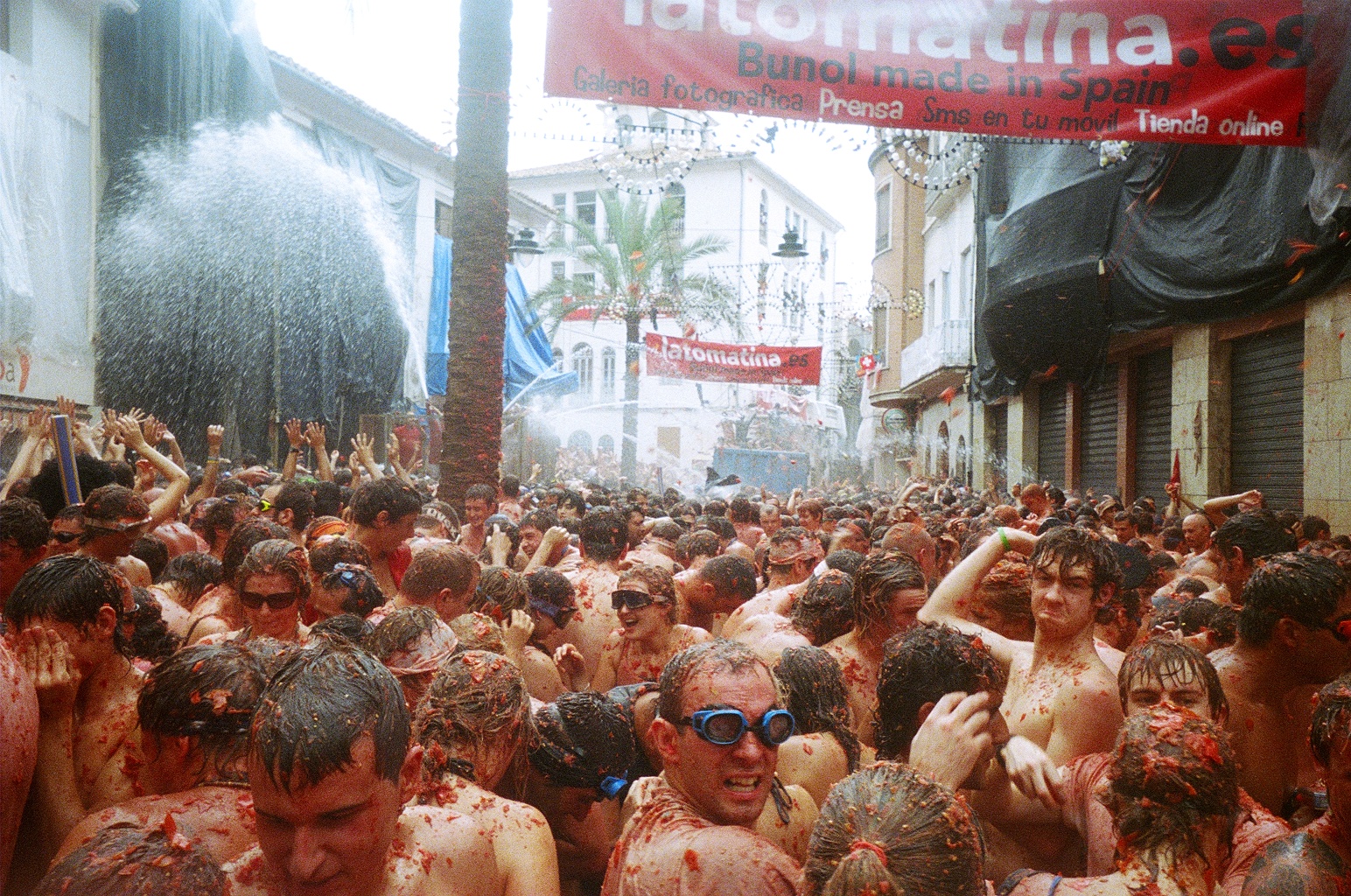
It's just occurred to me that I may be able to take part in the world famous La Tomatina! For those of you who aren't aware, La Tomatina can only be summed up as the world's BIGGEST FOOD FIGHT. 

Now, I can imagine most of your are thinking this is going to be one of those crazy old traditions that has maybe 80-100 people and just a small table of food...WRONG.

Once in a year, in the town of Bunol, in the region of Valencia, (The University I will be studying at during the summer) tens of thousands of people descend on the small town of Bunol. Although this town only has a population of 9000, it is no surprise to see between at least 20 000 - 50 000  turn up to take part in this phenomenon.

In short, each year, on the last Wednesday of August,  tens of thousands of people gather in the streets to throw TONS of over-ripe tomatoes at each other for exactly an hour. It has been estimated that around 150 000 tomatoes, or 90 000 pounds of the food are thrown in this hour. 

The festival is a week long and consists of dancing, street parties, fire works and on the night before the fight itself, a paella cooking competition. 

Perhaps the strangest and yet most interesting fact about this famous event, is that no one is quite sure as to how it officially started. Of course there are rumours that it was simply witnessing a group of children having a food fight in the street, no one is quite sure of the official reason.


I am SO excited to think I may be able to actually participate in this! Pictures below!


Read more...

Thursday, 23 September 2010

A well equipped laptop is key

Another update for you travellers out there on how to prepare not just yourself, but also your laptop before travelling. This can also apply for all you University go-ers that are heading off this week. Now, if you plan to take a form of entertainment with you, I.e A gaming console or your DVD collection then you may not find this guide as life saving, but merely as another source of entertainment.

See when most people go travelling or go off to university they automatically accept that when they arrive at their residence they will have instant internet access. However, depending on your halls/residence/hotel, it can take several days or even weeks to set up a decent internet connection.

Depending on how sociable you are or how much of internet addict you are, this may not be a problem. But if you do crave the internet and are not guaranteed a connection upon arrival, I suggest the following tips.

Project64


This was probably the biggest life saver for me. For those of you that aren't aware, Project64 is a N64 emulator. In short, it's a program available for free download that allows you to play your favourite N64 games on your laptop. The games, referred to as ROMS, can also be downloaded from a separate website.
I must have spent countless hours rejoicing my childhood moments on these games. Although the gameplay can be a little difficult to get used to at first (the fact that you laptop lacks a analog stick and you have to make  do with the direction keys), it is definately worth downloading this program.

Most games will run on just about any generic laptop, I.E you don't need to have amazing computer specs to run this program efficiently. But I do recommend you close down any programs which take up a large amount of the CPU for smoother gameplay. EG Virus scanners etc.

Project 64 can be downloaded here:

http://www.pj64-emu.com/downloads/startdown/34/

Although there are a variety of websites that boost Project64 ROMs, I prefer this site:

http://www.freeroms.com/n64.htm

The program itself is dead easy and straightforward to use. Simply download the ROM ( I suggest keeping them together on a file located on your desktop) Then open up Project64,

File > Open Rom > Find Rom

It's as simple as that. You can also change the default control (Options > Controller Plug In) to suit your gaming needs.


On another note, if you do find gameplay to tedious using your keyboard, you can buy N64 controllers with USB adapters for quite cheap online these days.

That's all I have on Project64, any questions feel free to post below.


DVDs


Now, to most of you this may seem like an obvious one, but depending on your suitcase space and dvd collection itself, you may be limited to bringing dvds upon your travels. For this, I recommend you try to find a way of ripping the DVD to your laptop. Failing that, download it. Although I do not recommend either of these methods as they are illegal, it can be down and there are plenty of guides on how to do so out there.

When I got bored of exploring Hyrule on Project64, I simply loaded up my favourite film, Memento, and an hour and a half soon flew by.


Last but not least, an obvious but often taken for granted:

Solitaire


A very simple, yet EFFECTIVE way of killing time. Not much to say about this one. Pretty much everyone know's how to play it, and it can be found by clicking Start > Games > Solitaire.


That's pretty much it from me guys. If you can think of anything I've missed then let me know! But make sure you do a bit of research before you leave guys as life without internet and be killer!
Read more...

Friday, 10 September 2010

Two VITAL cards to take

So, pretty sure I'm leaving for Strasbourg either Sunday or Monday! Excitement is kicking in.

Here's another key tip for you travellers:

Travel Ex Cards:


I mentioned these in my 'What to pack' guide. For those of you who have been abroad before I wanted to withdraw money from an ATM using your debit or credit card, you'll notice when you return home there's a nasty fee for using your card abroad. Now, most banks will promise you it's only a minimal charge in comparison to the conversion rate and all this rubbish but the truth is, if you use your card abroad, you're most likely going to be charged for it. Now, I'm going to be using my card for a year, and I don't fancy returning home to £300 of just charges.

This is where Travel Ex comes in. Basically, a Travel Ex card is a card that can be bought for however much money you would like on that account. For example, I purchased a Travel Ex card for £100.60 with £100 (155 euros worth) on it. It can be used at anyone ATM displaying the Mastercard logo and I will not be charged to withdraw my own money! As I created account with cashpassport (the site you use to sign up for the card) I can transfer funds between my regular bank and my Travel ex card whenever I want. So glad my friends informed me of this and I would STRONGLY URGE any travellers out there for an extended period of time to invest in one of these!

Can sign up here:

http://www.cashpassport.com/


Card number 2:

E111 Card.


Now, hopefully I will never have to use this card. Basically it's a European health insurance card that will mean if I do fall ill, I will be able to save a large percentage of the fees. For those of you who have fallen ill abroad before and had to purchase medicine, you'll know exactly how I feel when I detest paying such large fees for anti biotics etc. Although this card doesn't entitle free health care, it WILL cut down your medical fees buy a substantial amount.

Applying for one of these cards is easy enough. You can either pick up a E111 form from your local post office  or you can apply online here:

https://www.ehic.org.uk/Internet/home.do

NOTE: This card is only available to UK residents
NOTE: This card is completely free, but some places will try and charge you. DO NOT LET THEM CHARGE YOU 
Read more...

Wednesday, 8 September 2010

Tips on what to pack when studying abroad

Another post for all you travellers out there with some information on key items to take when travelling. This is going to be primarily based on first hand experience (even 5 days at Reading Festival was a huge lesson on the DO's and DONT's for what to pack!)

So I hope you guys find this useful, and even if you don't, it'll be a good reminder to myself for when I leave in the next fortnight!

Right let's crack on, and remember this is personal opinion! So if you disagree or feel I've missed something, let me know!


Documentation:

Passport and a several photocopies of said passport
Several passport sized photos (These can come in really handy)
Proof of insurance
Acceptance letter or proof of study from university (whether it's the abroad university or your home university)

Cards and licenses:

Debit card
Driving or provisional license
TRAVELEX CARD (This is so important and I'll provide a post about it soon)

Clothing:

Now, this is far more easier for boys than girls!

One pair of COMFORTABLE shoes. I can't stress this enough. Unfortunately shoes take up a lot of space in the bag so it's likely you're only going to have room for just the one pair. You're going to be doing A LOT of walking whilst abroad and I strongly recommend you choose comfortability over style. Although you don't want to look like a tramp for your travels, you're going to be on your feet the majority of the time, and being comfortable is always a bonus over fashion.

For clothing, make sure you research the weather for where you're staying. I.E Don't pack tight tee shirts if it's going to be 30 degrees Celsius! Only take the essentials. I suggest you chose darker clothes as dirt and marks don't show up as well compared to white or lighter clothing. Although you don't want to look scruffy for a year, don't take any clothing that you don't mind loosing or getting damaged.

Toiletries:

Again, this is a much easier decision for guys. I would only recommend taking a toothbrush here. Although foreign  stores may not sell your favourite brands, they will still stock types of deodorants and toothpaste etc, so I recommend buying most toiletries whilst out there.

Girls, the same is probably true for your make up. Remembering, your spending your time travelling and chances are, you're not going to look your greatest. That said, most stores will sell make up, but you may have to fork out a bit more cash if you're looking for your high market brands.

Misc:

A small torch
Plug converters
Small notepad and pen
Money Clips
Maps
Extra SD cards for your camera!
A large ruck sack (This saves taking your suitcase everywhere, allowing you to carry your essentials whilst leaving  clothes etc wherever you're staying)


Read more...